MCP explained: I built a tiny server and recorded every message
What the Model Context Protocol is in plain English, what changed in the 2026-07-28 version, and a real Python server I ran on my Mac: 8 requests, 8 answers, no AI model needed.
The usual one-line answer to "what is MCP?" is "a USB-C port for AI apps", which is true and also tells you nothing about what goes over the wire. So I built the smallest MCP server I could, connected a client to it, and saved every message the two programs sent each other.
This post is what I learned. It is written for someone who has used ChatGPT or Claude but has never looked inside a tool connection.
What MCP is
MCP stands for Model Context Protocol. A protocol is an agreement about which messages two programs send and what each one means. MCP is the agreement that lets an AI app use outside tools and data in one common way.
Before MCP, every app needed its own connecting code for every tool. Anthropic's launch post said it plainly: "every new data source requires its own custom implementation". With MCP, if a tool speaks the protocol, every app that speaks it can use that tool.
A few dates, because they explain why you see MCP everywhere now:
- Anthropic open-sourced MCP on 25 November 2024, with ready-made servers for Google Drive, Slack, GitHub, Git, Postgres and Puppeteer.
- On 9 December 2025 it moved to the Agentic AI Foundation, a group inside the Linux Foundation that Anthropic, Block and OpenAI started together.
- The MCP docs list Claude, ChatGPT, VS Code, Cursor and MCPJam as apps that support it. The foundation post adds Gemini and Microsoft Copilot.
- The current version is dated 2026-07-28.
Hosts, clients and servers
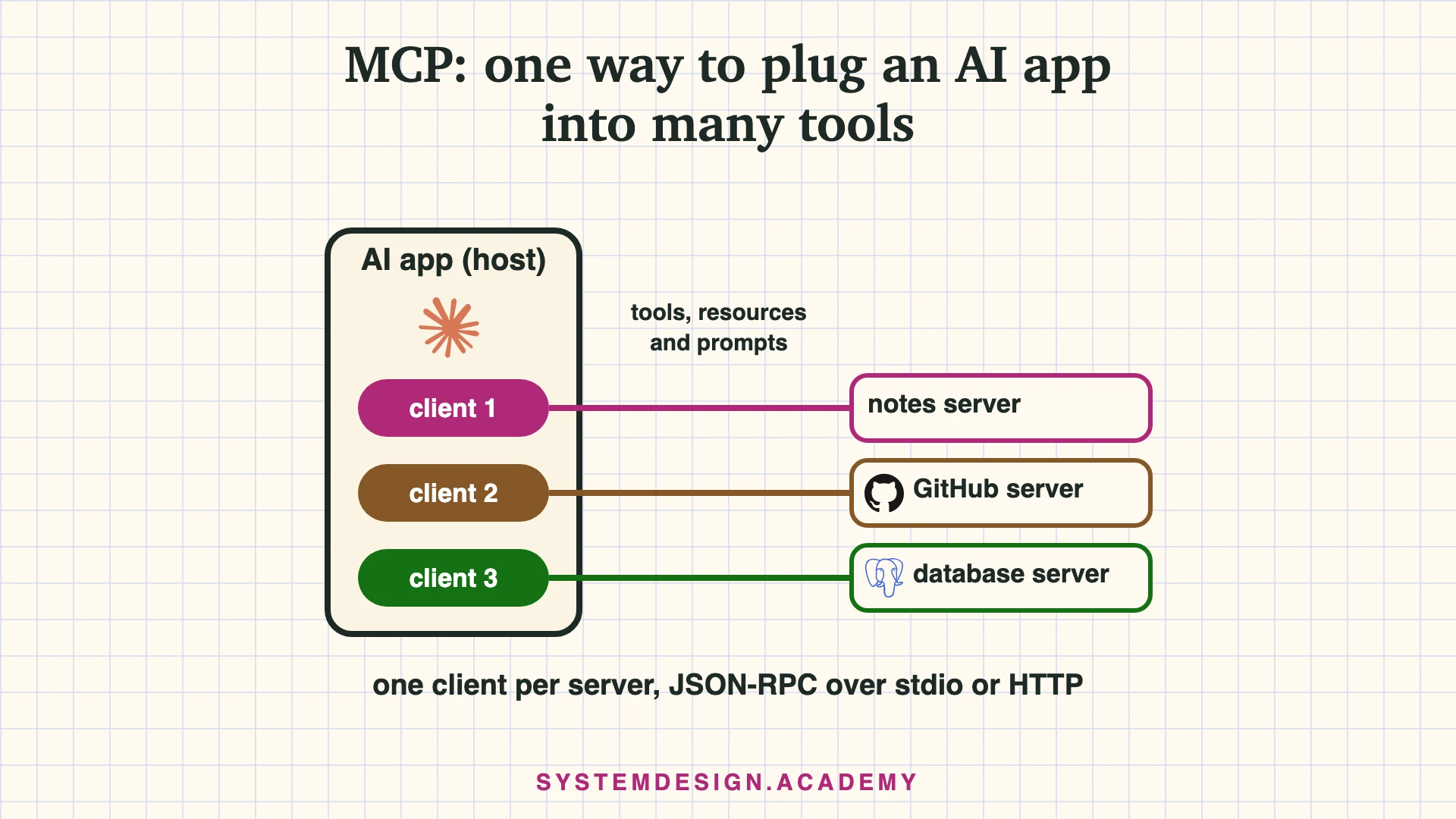
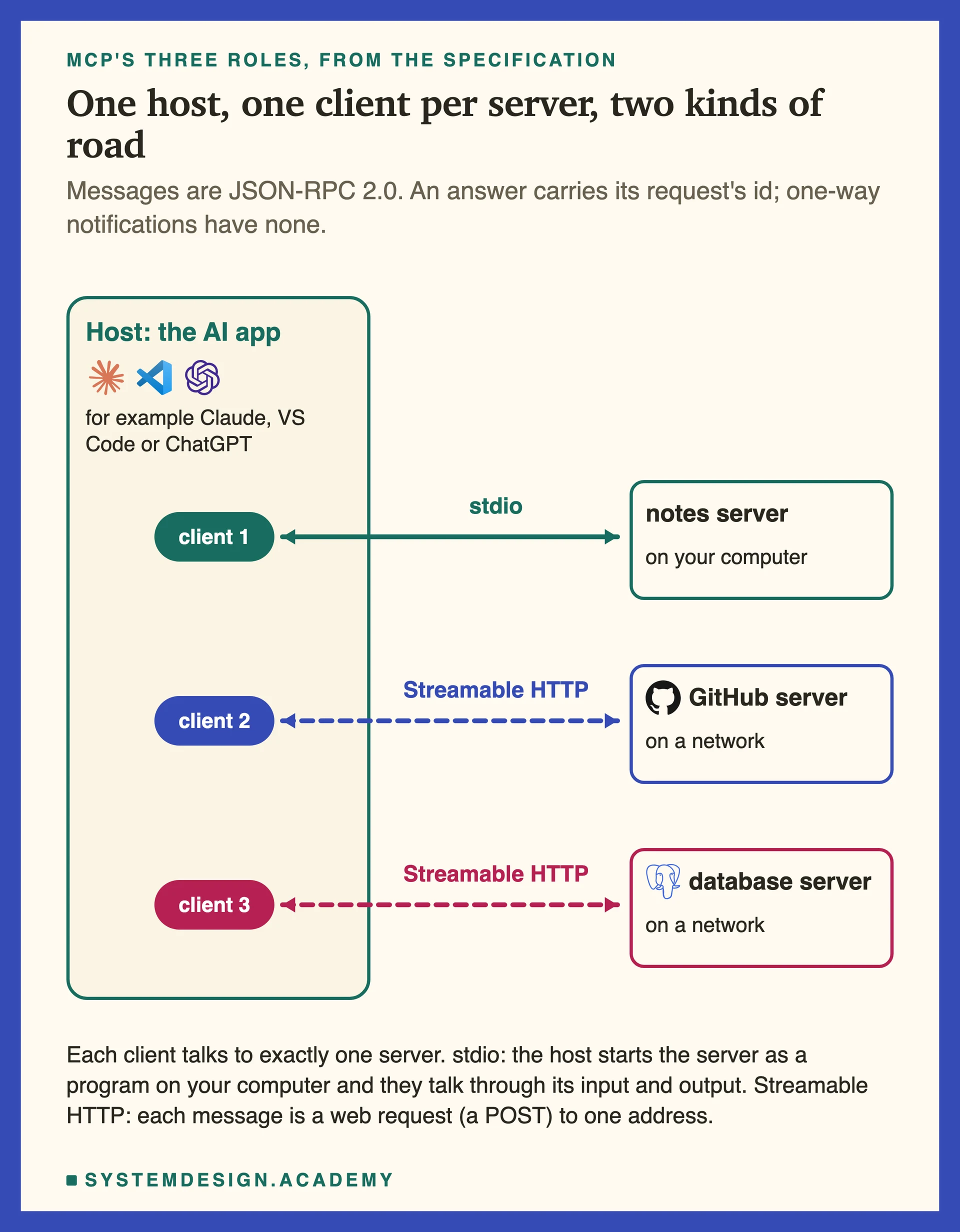
MCP has three roles:
- The host is the AI app you use, for example Claude Desktop or VS Code.
- A server is a small program that offers tools or data, for example a GitHub server.
- A client is the part inside the host that talks to one server. A host that uses three servers holds three clients.
They talk in JSON-RPC 2.0. JSON is a simple text format for data, and RPC means "remote procedure call", which is asking another program to run something. Each request has an id number, and the answer carries the same id, so the client knows which answer belongs to which question.
Messages travel over one of two roads, called transports. With stdio, the host starts the server as a small program on your computer and they talk through its standard input and output, the way a terminal program reads what you type. With Streamable HTTP, each message is a normal web request (an HTTP POST) to one address, usually on another machine.
What a server can offer
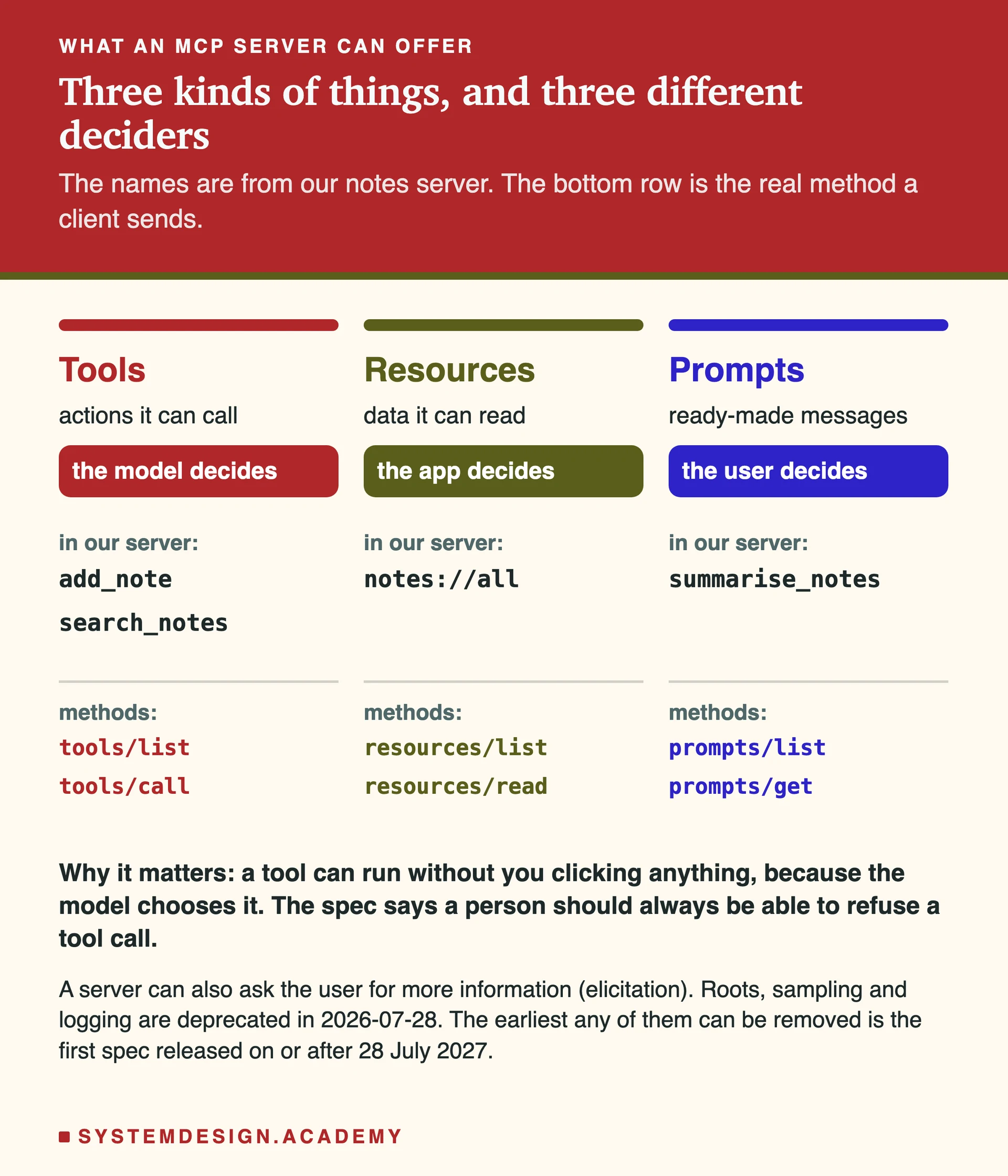
A server can offer three kinds of things. What I find most useful is that the specification also says who decides when each one is used:
- Tools are actions, like "search my notes" or "create a GitHub issue". The AI model decides when to call them.
- Resources are data, like a file or a list of notes, each with an address such as
notes://all. The app decides when to read them. - Prompts are ready-made messages, like "summarise my notes". The user picks them, often from a menu.
This matters for safety. When the model decides on its own, a misleading tool description can steer it.
What changed in July 2026
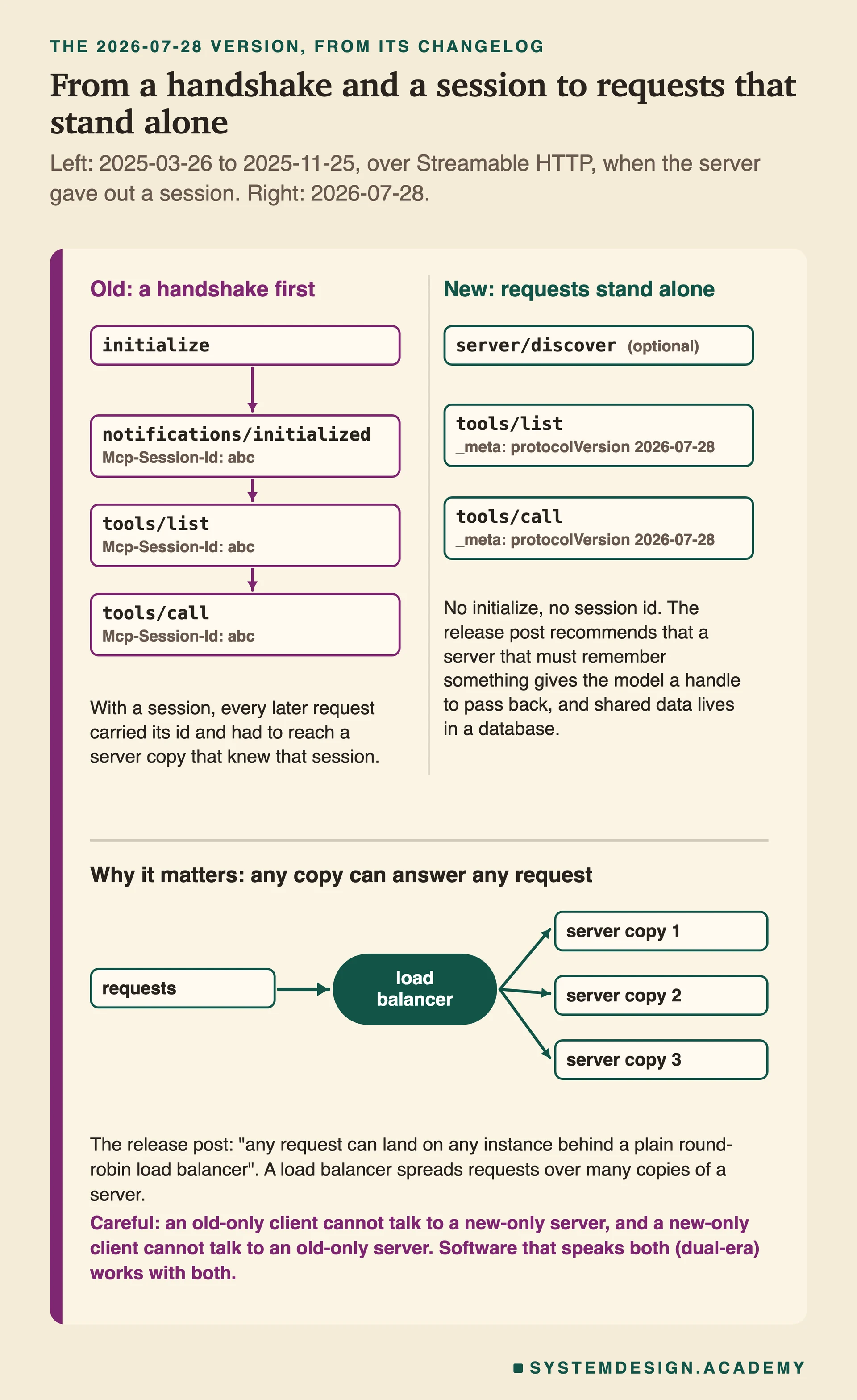
The biggest change in version 2026-07-28 is that MCP became stateless.
In older versions, a client first sent initialize, the server answered, the client sent initialized, and only then could real work start. That opening exchange is called a handshake. Over HTTP, the server could also hand out a session id, and every later request had to reach a copy of the server that remembered that session.
The new version removes both. Every request now carries the protocol version and what the client can do, inside a field called _meta. The release post says that "any request can land on any instance behind a plain round-robin load balancer". A load balancer is the program that spreads requests over many copies of one server.
One catch I want to be honest about: this is true of the protocol only. If your server keeps its own data in memory, like my demo below does, each copy has different data. Real servers keep shared data in a database.
There is also a new method, server/discover, which lets a client ask "who are you, which versions do you speak, what can you do?". And mixing versions needs care: the spec says an old client cannot talk to a server that speaks only the new version, and the reverse is also true. Software that speaks both is called dual-era. The Python SDK I used is dual-era.
The server I built
I used Python 3.12 and the official SDK, mcp version 2.3.0 (an SDK is a library that does the protocol work for you). The server keeps three notes in a Python dictionary and offers all three features: two tools, one resource and one prompt. It has no login and no limits, so it is a teaching demo, nothing more.
from mcp.server import MCPServer

mcp = MCPServer("notes", version="1.0.0")

NOTES = {
    "groceries": "Buy milk, eggs and bread.",
    "meeting": "Team meeting on Friday at 10am.",
    "idea": "Write a short guide to MCP.",
}

@mcp.tool()
def add_note(title: str, text: str) -> str:
    """Save a new note under a title."""
    NOTES[title] = text
    return f"Saved note '{title}'. You now have {len(NOTES)} notes."

@mcp.tool()
def search_notes(word: str) -> list[str]:
    """Return the titles of notes that contain a word."""
    word = word.lower()
    return [title for title, text in NOTES.items() if word in text.lower()]
The resource and the prompt are two more short functions with @mcp.resource("notes://all") and @mcp.prompt() above them. The full file is on the original page.
Look at what is missing: no JSON, no message ids, no transport code. The SDK reads each function's name, inputs and docstring and turns them into the descriptions a client sees.
Eight requests, eight answers
A small client started the server over stdio and did eight things in order: discover the server, list tools, list resources, list prompts, call add_note, call search_notes, read notes://all, and get the prompt. This is the real output:
$ python client.py
1. Discover  -> notes | protocol 2026-07-28
2. Tools     -> ['add_note', 'search_notes']
3. Resources -> ['notes://all']
4. Prompts   -> ['summarise_notes']
5. add_note  -> Saved note 'mcp'. You now have 4 notes.
6. search    -> {'result': ['idea', 'mcp']}
In total the client and server exchanged 16 messages: 8 requests and 8 answers, all on version 2026-07-28. There was no initialize message anywhere in my log. No AI model and no API key were involved. So you can build and test a full MCP server without paying for a single token.
I also put a tiny script between the two programs that copied every message to a file. The first request is server/discover, and the answer lists what the server offers plus two cache hints that the new version added: ttlMs (how many milliseconds a client may keep the answer) and cacheScope.
Checking it with the official Inspector
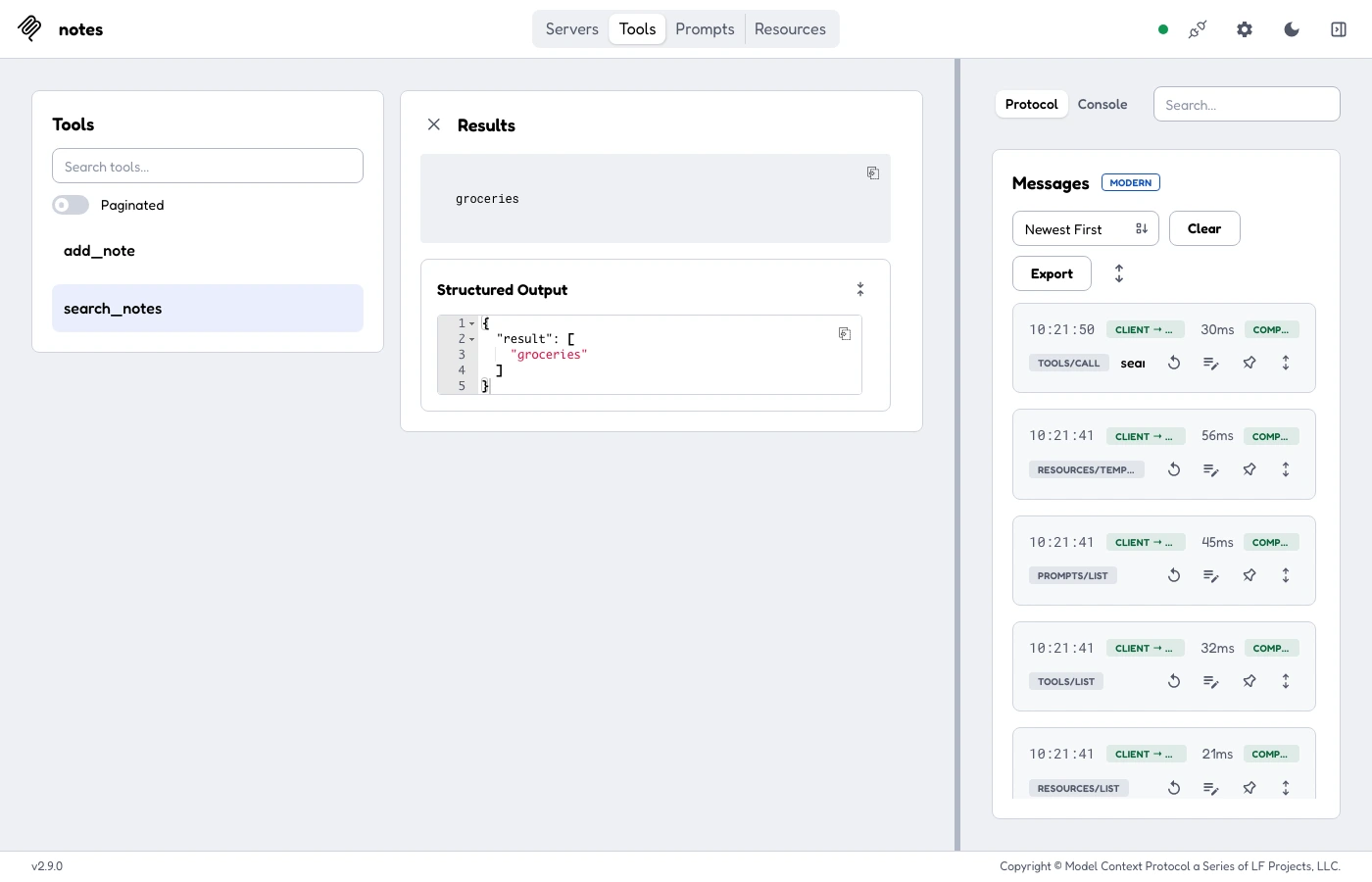
The MCP Inspector is the project's own test tool. Version 2.9.0 has a web page, a command line and a terminal screen. One thing caught me out: by default it still spoke the old protocol. Its command line sent initialize with version 2025-11-25 and the web page showed a LEGACY label. I had to add "protocolEra": "modern" to a small settings file before it used the new version.
Over HTTP the same server answered a plain curl request with 200 OK, as long as I sent three headers: MCP-Protocol-Version, Mcp-Method and Mcp-Name. Without them, the server treated my request as the old protocol, answered 400 Bad Request with "Missing session ID", and handed out a session id. That is what a dual-era server is supposed to do, and it is a good thing to know before you debug a "broken" gateway.
Keeping it safe
An MCP server runs code and can reach real systems. The spec and its security guide set firm rules. These are the ones I would explain to any team before they connect a server:
- A person should be able to say no. The spec says there should always be a person who can refuse a tool call. The protocol cannot enforce it, and many apps offer "always allow".
- Tool descriptions are not trusted. Hints like "read only" come from the server. Clients must not believe them unless they trust the server.
- No passing tokens through. A server must not accept a token that was not made for it, so it cannot take your GitHub token and forward it.
- Prompt injection comes back through results. Text from a tool goes into the model's context. If anyone can write that text, like the notes in my demo, they can hide instructions in it.
- One-click installs must show the exact command. A local server runs with your permissions and can open your files.
My own rule on top of these: treat an MCP server like any program you install. Read what its tools do and give it only the keys it needs.
What I could not check
I ran one small server and three clients on one Mac. I did not connect it to Claude or ChatGPT, and I did not test OAuth, error answers or the newer multi-round-trip requests. The protocol facts come from the 2026-07-28 specification, the MCP docs and blog, and Anthropic's launch post.
The original page has the full server and client, the raw message log, the curl session and the complete security checklist with links to every source: MCP explained, with a tiny server you can run.
If you want to go further
I write two courses on systemdesign.academy. AI Engineering teaches how to build AI systems that hold up in production: RAG, AI agents, evals and model serving, with real labs. It has a full lesson on what MCP buys and costs in production. It is $49, paid once. See the AI Engineering course.
My other course, the System Design Masterclass, goes from caching and databases to distributed systems, with interview designs like Uber, Netflix, Stripe and WhatsApp. It is also $49, paid once. See the System Design course.